New dish, new price, new season — and the menu on the tables is already out of date. Type your dishes below and download a clean, styled A4 menu PDF: sections, dotted price leaders, allergen footer note, ready to print. Free, no signup, and your prices never leave your browser.
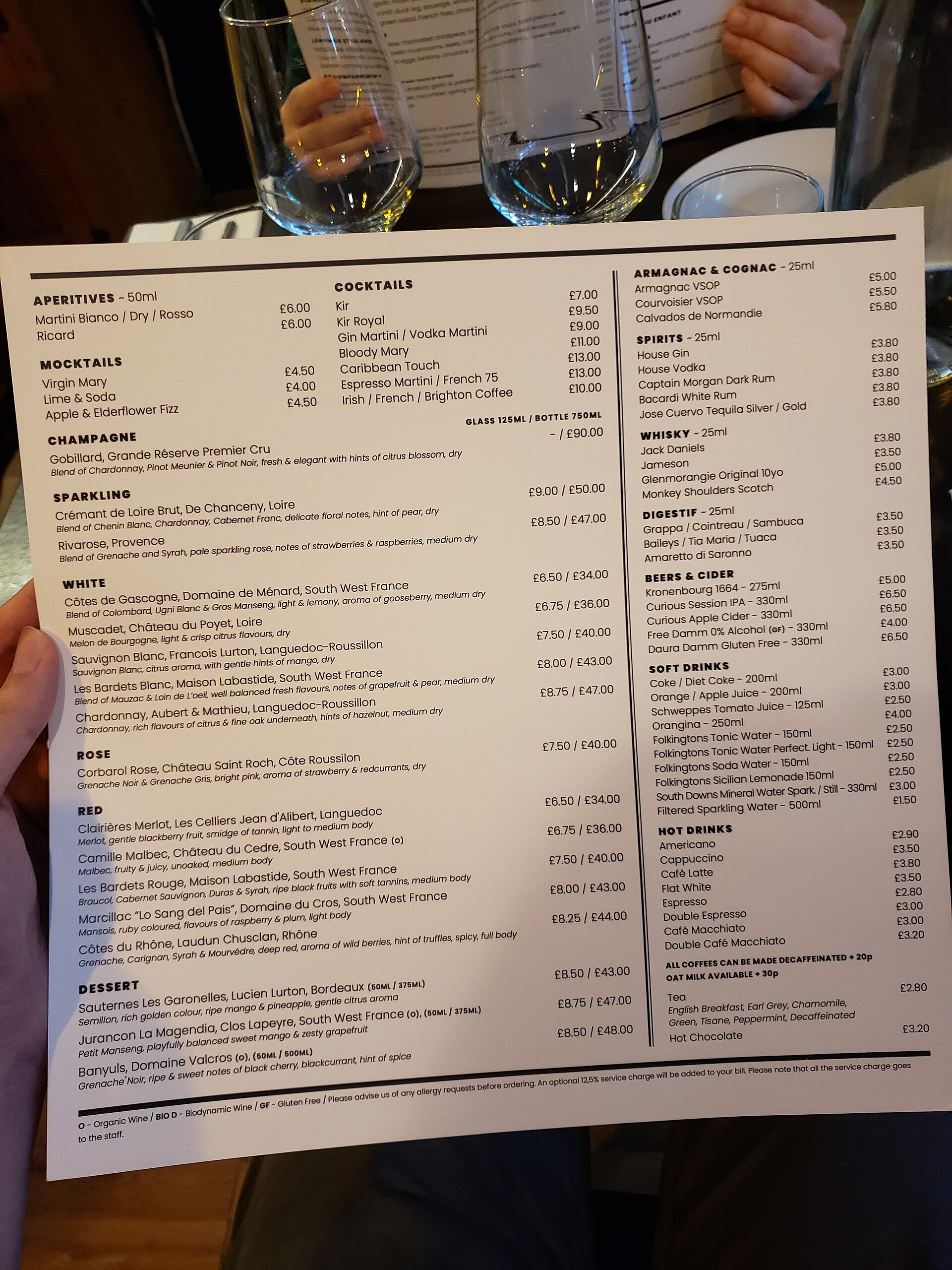
The PDF is a styled A4 menu: restaurant name and tagline at the top, one section after another with dotted price leaders, and your footer note at the bottom. Print at 100% scale on card stock for table menus.
Quick answer: It turns the dishes and prices you type into a styled, print-ready menu PDF. You fill in your restaurant name, tagline and currency, edit the dishes in each section — Starters, Mains, Desserts and Drinks — add a footer note for allergens or service charges, and download an A4 menu with dotted price leaders. The whole thing runs in your browser, so nothing is uploaded and there is no account to create.
Menus change constantly: a supplier raises the price of salmon, a seasonal dish sells out, a new dessert lands on the specials board. Every change used to mean a call to the designer and a new print run. A browser menu maker cuts that loop to two minutes — edit the price, download, print one fresh copy.
A good menu is also a sales tool, not just a list: the order of sections and the dishes you put first shape what guests order — which is why this page also covers menu order and pricing below. The tool itself stays simple: clean type, clear sections, prices on the right.
Guests read a menu the way they read a page: top first, then down. Put your best-margin dishes near the top of each section, and your signature dish first in Mains. Keep sections in the order guests eat: Starters, Mains, Desserts, Drinks. A menu with more than about 25 dishes slows guests down and wastes kitchen time — if everything is on the menu, nothing stands out.
| Section | Typical dishes | Price guide (Berlin, 2026) |
|---|---|---|
| Starters | Soup, salad, bruschetta, olives | €5 – €9 |
| Mains | Pasta, pizza, fish, meat, vegetarian | €12 – €24 |
| Desserts | Tiramisu, gelato, cake, fruit | €5 – €8 |
| Drinks | Water, soft drinks, wine, coffee | €2 – €9 |
Pricing follows a simple rule most small restaurants use: the food cost of a dish should be about 25–35% of its menu price. The rest covers labour, rent, energy and profit. The formula is: menu price = food cost ÷ target food-cost percentage.
Take the Margherita on the example menu: dough, tomato, mozzarella and basil cost about €3.50 per pizza. At a 30% food-cost target, the menu price is €3.50 ÷ 0.30 = €11.67, rounded to €12 on the menu. At €12, the food cost is 29% of the price (€3.50 ÷ €12), leaving €8.50 to cover everything else. The same maths prices the whole menu: a pasta with a €4.20 food cost at 30% becomes €14, and a tiramisu costing €1.80 becomes €6. Re-run the numbers whenever a supplier changes a price.
EU Regulation 1169/2011 requires allergen information for the 14 main allergens to be available for every dish. Put the line in the footer note field so it prints on every copy.
Check every price against your till or POS before printing. A menu price that differs from the till price is the fastest way to lose a guest's trust.
Read the menu aloud before downloading — spelling mistakes on a menu are the ones guests photograph and share. Check dish names and prices digit by digit.
Print a single menu first and hold it at arm's length. If the smallest price is hard to read, the font is too small; if the menu runs to two pages, trim a dish or two.
The tool draws a clean text-only menu. If your brand needs a logo or dish photos, add them after downloading with our free add-image-to-PDF tool — or print the menu on pre-printed letterhead with your logo already on it.
Menus are always A4 with the same clean layout. If you need a folded A5 menu, print the A4 PDF at 70% on A5 card, or split the sections across two pages by downloading twice with fewer dishes.
The tool does not check your prices against any market — the Berlin ranges above are a guide only. Your costs, your rent and your guests decide the right price.
Type your restaurant name, tagline and dishes with prices into the tool above — Starters, Mains, Desserts and Drinks are pre-filled as an example — then press Download menu PDF. The tool draws a styled A4 menu in your browser. Nothing is uploaded, and there is no signup.
Yes — unlimited menus, every section and dish, PDF download, forever. No trial, no watermark, no account, no payment details. It runs entirely in your browser, so your dishes and prices are never uploaded to any server.
Yes. Every section has an “Add dish” button and each dish row has a remove button, so you can build a menu of any length. Rename a section by typing over its heading — Starters, Mains, Desserts and Drinks are just the defaults.
For table menus, A4 or A5 card stock (200–250 gsm) feels right and survives handling; for a menu board or a takeaway sheet, ordinary 80–120 gsm paper is fine. Print at 100% scale and check one copy before printing the stack.
In the EU, Regulation (EU) No 1169/2011 requires allergen information for the 14 main allergens to be available for every dish — on the menu, on a separate sheet, or verbally on request. This tool has a footer note field for exactly that: write your allergen line there so it prints on every menu.
Not in this version — the tool draws a clean text-only menu. If you need a logo, add it after downloading with our free add-image-to-PDF tool, which places your logo at the top of the finished menu.
No. The PDF is built with JavaScript on your own device — your restaurant name, dishes and prices never leave this page. Close the tab and everything is gone.
Allergen duties follow Regulation (EU) No 1169/2011 on the provision of food information to consumers, which requires allergen information for the 14 listed allergens. Price ranges are a Berlin guide for 2026, not a quote — your costs decide your prices. Figures in examples are illustrative. By Amir Shahzad · Last updated 24 November 2026.
Card photos: DemieK07 / Wikimedia Commons, CC BY-SA 4.0 · Alexander Grebenkov / Wikimedia Commons, CC BY 3.0 · Pixabay / Pexels, Pexels Licence
Educational content only. Nothing on this site is legal or professional advice.
 Free PDF Toolkit